
Step 3: Review Bids & Choose Your Genie
Once your task is open for bids and Genies start applying, you can review all submissions from the Applicants tab and hire the right person directly from there.
1. Open Your Task and Go to the Applicants Tab
From your Task Board, find your task and click it to open the Task Page. At the top of the page, click the Applicants tab. This is where all submitted bids appear.
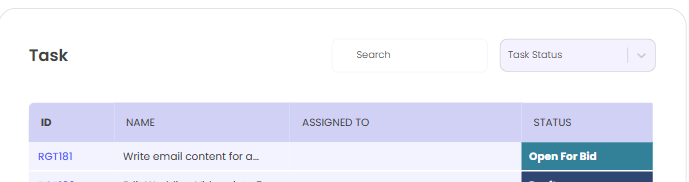
2. Review the Applicant List
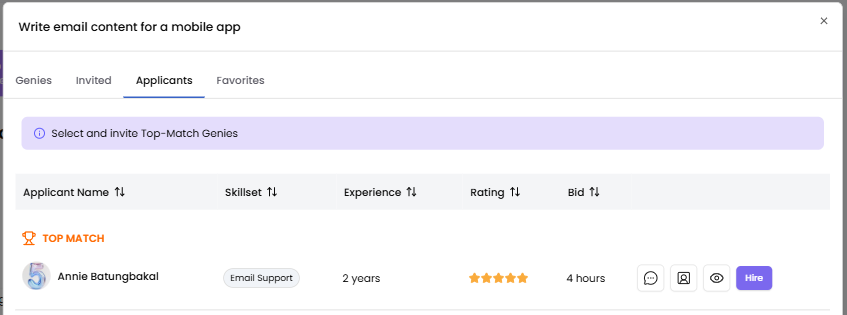
The Applicants tab shows a structured list with the following details for each Genie:
Profile Photo, Full name, Skillset, Experience, Rating, Bid
The list defaults to Top Match first, then by highest rating. You can also sort by any column — name, skillset, experience, rating, or bid amount.
Top Match Section
The top applicants that best fit your task (based on skillset relevance, experience, and rating) are grouped under a Top Match label at the top of the list. These are the Genies most aligned with what you posted.
3. Compare Your Options
Before hiring, you can take these actions on any applicant:
Chat — Click the Chat button to open a direct message thread with that Genie. Use this to ask clarifying questions before committing.
View Profile — Opens the Genie's full profile in a new tab. You'll see their experience summary, skills, work history, and portfolio if available.
View the Bid Proposal — Click the eye icon to read the Genie's full submission: why they believe they're the right fit, their estimated hours, skill tags, and any portfolio attachments they included.

4. Hire Your Genie
When you've decided:
-
Click the Hire button next to the Genie you want.

-
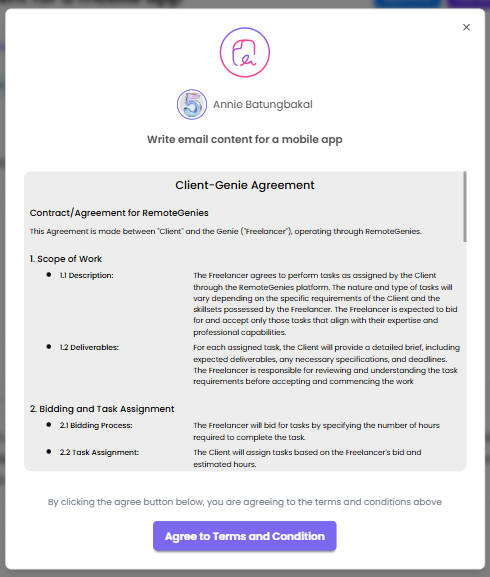
A Client–Genie Agreement will appear. Review the agreement, then click Agree to Terms and Conditions to confirm.
-
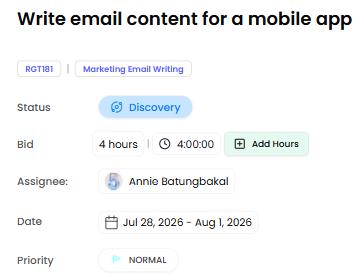
Once confirmed, the Genie is assigned to your task. The task status changes to Discovery. Other applicants will not be able to apply/send bids for the task.
If you run into an error when clicking Hire, try refreshing the page and attempting again. The issue is typically transient.
What Happens Next
After hiring, your task moves forward and your assigned Genie can begin working. Your dedicated project coordinator is also looped in to keep things on track from here.
Full interactive demo
Click through the demo at your own pace — no login required.
